
Debugging FFS Mount Failures
Note: This post was originally written in 2019 and has been lightly refreshed for clarity. The content and examples are unchanged — just the presentation got a coat of paint.
This is the third installment in the fuzzing filesystems series. The previous two parts covered the fuzzer setup and AFL+KCOV methodology (part one, part two); I also gave a talk on this at EuroBSDcon 2019 in Lillehammer (slides).
Here I want to describe the process of finding the root cause of filesystem issues and the tooling work I did to make that process less painful.
The story starts with a mount failure I found on the very first AFL run.
The Invisible Mount Point
afl-fuzz: /dev/vnd0: opendisk: Device busy — that was the first error I saw after
a few seconds of fuzzing. I suspected the mount wrapper at first. After a longer
debugging session I realized it was something more interesting.
To explain what was happening without going deep into the fuzzer setup: assume a
broken filesystem image exposed as a block device at /dev/wd1a. The device mounts
onto mnt1 without complaint, but unmounting it returns No such file or directory.
The raw unmount(2) syscall fails the same way.
The mount point is clearly there:
# mount
/dev/wd0a on / type ffs(local)
...
tmpfs on /var/shm type tmpfs(local)
/dev/vnd0 on /mnt1 type ffs(local)
But anything lstat(2)-based disagrees:
# ls / | grep mnt
mnt
mnt1

# ls -alh /mnt1
ls: /mnt1: No such file or directory
# stat /mnt1
stat: /mnt1: lstat: No such file or directory
Getting Past the Standard Tools
mnt1 is a directory on the root partition, so getdents(2) — which reads directly
from the on-disk directory structure, bypassing VFS lookup — should confirm it exists:
# ./getdents  /
|inode_nr|rec_len|file_type|name_len(name)|
#:   2,      16,    IFDIR,       1 (.)
#:   2,      16,    IFDIR,       2 (..)
#:   5,      24,    IFREG,       6 (.cshrc)
#:   6,      24,    IFREG,       8 (.profile)
#:   7,      24,    IFREG,       8 (boot.cfg)
#: 3574272,  24,    IFDIR,       3 (etc)
...
#: 3872128,  24,    IFDIR,       3 (mnt)
#: 5315584,  24,    IFDIR,       4 (mnt1)
mnt1 is there on disk. But every syscall that takes a path argument fails with
ENOENT:
unmount(const char *dir, int flags);
stat(const char *path, struct stat *sb);
lstat(const char *path, struct stat *sb);
open(const char *path, int flags, ...);
All of these go through VFS name lookup. Without understanding what happens inside that lookup, we cannot explain the failure.
Getting the Filesystem Root
Tracing through the code, I found the problem. When VFS resolves a path that crosses
a mount point, it calls VFS_ROOT on the mounted filesystem to get its root vnode.
For FFS, VFS_ROOT maps to ufs_root, which calls into vcache with the root
inode number — always 2 for UFS:
#define UFS_ROOTINO ((ino_t)2)
int
ufs_root(struct mount *mp, struct vnode **vpp)
{
        ...
        if ((error = VFS_VGET(mp, (ino_t)UFS_ROOTINO, &nvp)) != 0)
               return (error);
The debugger confirmed that inode 2 did not exist in the vcache. The question was what was on disk.
The Filesystem Debugger
fsdb(8) is a general-purpose filesystem debugger — it ships with NetBSD and links
against fsck_ffs, making it FFS-specific. Pointing it at the corrupted image:
# fsdb -dnF -f ./filesystem.out

** ./filesystem.out (NO WRITE)
superblock mismatches
...
BAD SUPER BLOCK: VALUES IN SUPER BLOCK DISAGREE WITH THOSE IN FIRST ALTERNATE
clean = 0
isappleufs = 0, dirblksiz = 512
Editing file system `./filesystem.out'
Last Mounted on /mnt
current inode 2: unallocated inode

fsdb (inum: 2)> print
command `print'
current inode 2: unallocated inode
The root inode is marked unallocated. The image below shows the on-disk layout for reference:
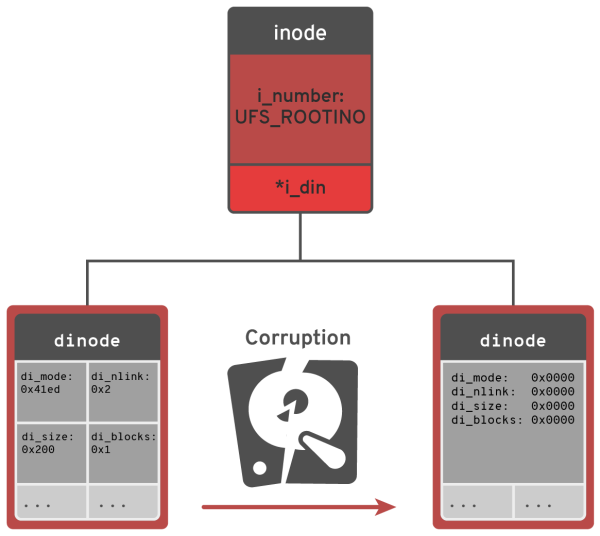
The stock fsdb output told us the inode was unallocated but not what the actual
field values were. That gap needed filling.
FSDB Plugin: Print Formatted
fsdb_ffs exposes the interfaces needed to walk on-disk structures, so I wrote a
small plugin — pf (print-formatted) — that dumps inodes, the superblock, and
cylinder groups in a readable format.
Pointing it at inode 2 on the corrupted image:
fsdb (inum: 2)> pf inode number=2 format=ufs1
command `pf inode number=2 format=ufs1'
Disk format ufs1 inode 2 block: 512
 ----------------------------
di_mode: 0x0                    di_nlink: 0x0
di_size: 0x0                    di_atime: 0x0
di_atimensec: 0x0               di_mtime: 0x0
di_mtimensec: 0x0               di_ctime: 0x0
di_ctimensec: 0x0               di_flags: 0x0
di_blocks: 0x0                  di_gen: 0x6c3122e2
di_uid: 0x0                     di_gid: 0x0
di_modrev: 0x0
 --- inode.di_oldids ---
Compare that to a root inode from a freshly created filesystem:
Disk format ufs1 inode: 2 block: 512
 ----------------------------
di_mode: 0x41ed                 di_nlink: 0x2
di_size: 0x200                  di_atime: 0x0
di_atimensec: 0x0               di_mtime: 0x0
di_mtimensec: 0x0               di_ctime: 0x0
di_ctimensec: 0x0               di_flags: 0x0
di_blocks: 0x1                  di_gen: 0x68881d2c
di_uid: 0x0                     di_gid: 0x0
di_modrev: 0x0
 --- inode.di_oldids ---
The fuzzer had zeroed out di_mode, di_nlink, di_size, and di_blocks. Those
are the fields that distinguish a valid directory from nothing.
From Debugger to Source
The chain is now clear:
unmount(2)fails innameibecause VFS cannot resolve the path- VFS cannot resolve the path because
VFS_ROOTfails on the mounted filesystem VFS_ROOTfails because it cannot load inode 2- Inode 2 has
di_mode == 0
That last link is in ffs_loadvnode:
         error = ffs_init_vnode(ump, vp, ino);
         if (error)
                return error;

         ip = VTOI(vp);
         if (ip->i_mode == 0) {
                 ffs_deinit_vnode(ump, vp);
                 return ENOENT;
         }
Any inode with i_mode set to zero is rejected. Inode 2 is no exception. The fix
is to validate the root inode at mount time rather than discovering the problem
later when a lookup crosses the mount point. I implemented that check and tested
it against the corrupted image — mount returned an error immediately, which is the
correct behavior.
The bug was reported with a proposed fix to the kern-tech mailing list.
Conclusions
This post traced a single fuzzer-discovered bug from an opaque Device busy error
down to a zeroed root inode on a corrupted FFS image. The investigation exposed a
gap in the existing tooling — fsdb could tell you an inode was unallocated but
not what was actually on disk — which led to the pf plugin.
Not every fuzzer find is a kernel panic. Some are quiet failures that require more patience to unravel.
What’s Next
Tooling: The fsdb-pf plugin still needs better support for walking inode block
lists and a recovery path for common corruption patterns.
Fuzzing: The next post will cover a remote AFL setup with a concrete usage example.
Validation: McKusick’s FreeBSD UFS security checks on mount(2) are worth
reviewing for additional validations that could be ported to NetBSD FFS.