Before the BSD Kernel Starts: Part One AMD64
Note: This article was originally written for and published at Moritz Systems in November 2020. Their website is no longer available; the content is republished here in its original form. The web archive version can still be found here.
System initialization is one of the niche areas that few people look into. The exact details vary considerably between different platforms, firmware, CPU architectures, and operating systems, making it difficult to learn comprehensively. Usually, if something is not working correctly during early system startup or the OS fails to boot, it rarely has anything to do with the boot code itself — most of the time it is due to other factors such as boot media or BIOS configuration. That said, understanding the early initialization process can help when debugging, or when familiarizing yourself with a new platform or hardware.
In this article I will walk through the early kernel initialization process on a well-known platform: AMD64. I will highlight a particularly interesting part — the early initialization of the kernel itself. In a follow-up, I will compare it with ARM64. In both cases the discussion is in the context of NetBSD, an operating system known for its portability.
The Bigger Picture
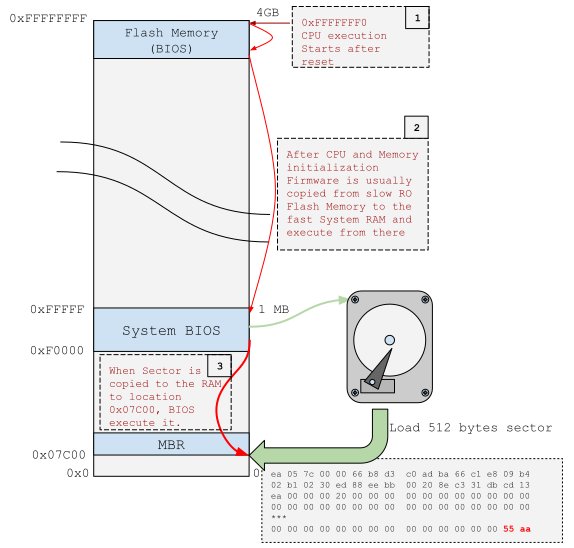
The CPU starting point is called the reset vector: the CPU bootstraps, then fetches and
executes the first instruction at physical address 0xFFFFFFF0. The bootloader must always
contain a jump to initialization code in those last 16 bytes. The CPU is in a variant of
real mode called unreal mode — 16-bit addressing with segments that can address up to 1 MiB.
After reset, the CS descriptor cache base field contains a special fixed 32-bit value:
0xFFFF0000. In real mode a program can change only the lower 16 bits of CS; the upper half
(the base) is set on reset and hidden. Using this, the instruction pointer addresses relative
to the last 64 KiB of physical memory, which is typically wired to read-only flash where
part of the platform firmware (BIOS/UEFI) resides.
BIOS or UEFI?
BIOS (Basic Input/Output System) is the term for legacy platform initialization firmware and the interface between the OS and the platform. It is used mostly with IBM PC compatible machines — personal computers and servers.
UEFI (Unified Extensible Firmware Interface) is a generic specification, not a particular implementation, and similarly defines an interface between the OS and platform firmware. UEFI was designed to replace legacy interfaces and be universal — applicable to PCs, servers, and embedded devices alike. It overcomes the limitations of BIOS: 16-bit processor mode, 1 MB of addressable space, limited bootable drive sizes. It also adds secure boot and UEFI runtime services.
Both BIOS and UEFI perform platform initialization and load the OS from physical media, but they do it differently. This article uses the legacy boot process based on the Master Boot Record (MBR); UEFI is a topic for another time.
Legacy BIOS
When the CPU starts after reset, most platform hardware is not ready: system memory (DIMMs) is not yet detected or initialized, timers and interrupts are not configured, and the PCI bus is not operational. Hardware initialization is the essential role of platform firmware.
At the start, firmware initializes the CPU and chipsets, then prepares memory. After memory is operational, in a phase called post-memory initialization, the firmware copies itself from slow flash to DRAM. The execution environment (stack, CPU mode) has to be prepared before any of this can happen.
At the latest phase, I/O devices are initialized, the PCI bus is enumerated, and the firmware searches for a bootable OS, loads the MBR from disk to memory, and executes it.
The MBR is the first sector on disk (512 bytes). It must end with the magic number 0xAA55.
This sector contains code that loads further sectors into memory to execute a higher-level
bootstrap program — because there is not much you can fit in 512 bytes. Only in this way
can we have a program complex enough to find and execute the kernel.
The Kernel is an ELF
The two most common executable formats are ELF (Executable and Linkable Format) and PE (Portable Executable). In UNIX environments, ELF is standard for program binaries; PE is used on Windows. The NetBSD kernel is an ELF executable.
Before main
We are used to thinking that programs start at main. Those who have looked at library
internals know about _start, called when the program is loaded into memory. In ELF
executables, execution actually begins at an entry point defined in the file header
(Entry point address).
We can verify this with readelf on the kernel binary:
$ readelf -h ./netbsd
ELF Header:
  Magic:   7f 45 4c 46 02 01 01 00 00 00 00 00 00 00 00 00
  Class:                             ELF64
  Data:                              2's complement, little endian
  Version:                           1 (current)
  OS/ABI:                            UNIX - System V
  ABI Version:                       0
  Type:                              EXEC (Executable file)
  Machine:                           Advanced Micro Devices X86-64
  Version:                           0x1
  Entry point address:               0xffffffff80209000
  Start of program headers:          64 (bytes into file)
  Start of section headers:          219286488 (bytes into file)
  Flags:                             0x0
  Size of this header:               64 (bytes)
  Size of program headers:           56 (bytes)
  Number of program headers:         2
  Size of section headers:           64 (bytes)
  Number of section headers:         39
  Section header string table index: 37
On an unstripped kernel, we can look up the symbol at that address:
$ readelf --syms ./netbsd.gdb | grep ffffffff80209000
 41333: ffffffff80209000     0 NOTYPE  GLOBAL DEFAULT    1 __text_user_end
 48452: ffffffff80209000  1096 FUNC    GLOBAL DEFAULT    1 start
The kernel entry point is start. Before we look into that function, we need to understand
how the CPU knows this starting point — and that means understanding how ELF programs get
loaded. When running on bare metal (without an OS), the program must arrange to load itself
into memory. That is what bootloaders are for.
A Few Words About Bootloaders
There are many ways to set up a platform boot chain. Different loaders such as grub or
u-boot can be configured for various hardware and operating systems. I mentioned GPT and
MBR partition schemes earlier — both can coexist as a hybrid. Rather than go deep into
disk layout, I will focus on the NetBSD default configuration.
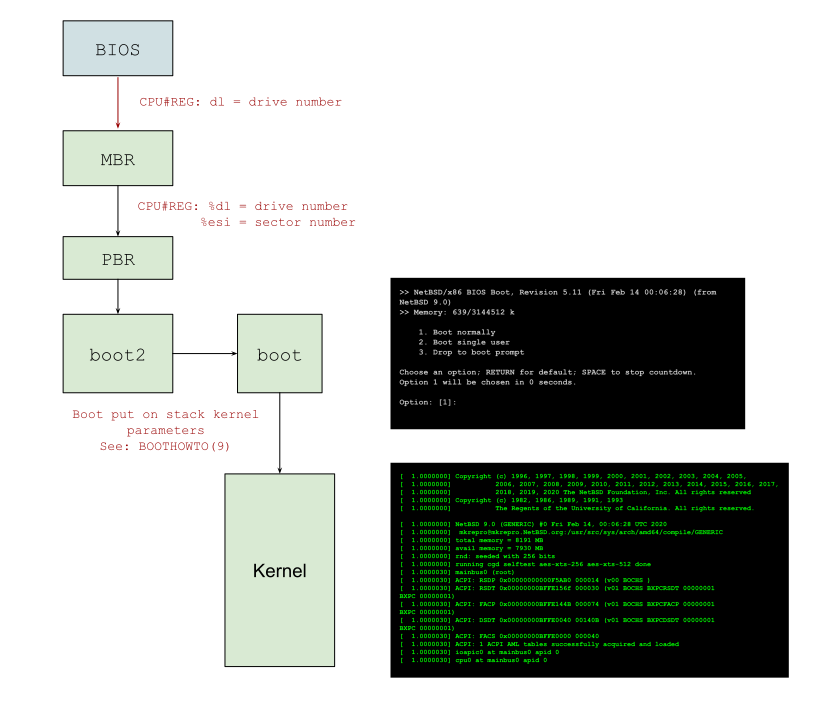
After BIOS finds a valid sector (with 0xAA55 signature), it loads the first disk sector
(MBR) to physical address 0x7c00, sets the DL register to the drive number, and
executes the loaded code.
For x86, NetBSD uses two first-stage loaders: MBR (mbr(8)) and PBR (Partition Boot Record),
named for the sectors they occupy. The MBR code relocates itself to 0x600, finds the
active partition, reads its first sector (PBR) to 0x7c00, and jumps to it.
PBR handles both the classical NetBSD chain and GPT partitions. In the GPT case, the EAX
register contains the constant !GPT (0x54504721) and partition metadata is passed via
DS:SI. Otherwise, only ESI contains the LBA from which the code was read. This lets
PBR select between two NetBSD installations on the same drive.
PBR identifies the drive from the DL register, finds and copies boot2 into memory,
and jumps to it. boot2 locates the boot program. boot presents the boot prompt,
allows the user to select a kernel, reads the kernel binary from the filesystem, parses
its ELF sections, loads them into memory, and executes the entry point.
start, locore.S, and Machine-Dependent Code
In NetBSD, the first code executed after the kernel is loaded is machine-dependent — which
should not be a surprise. It lives in the assembly file locore.S. A search under /sys/arch
shows that NetBSD has separate implementations for each architecture:
find ./sys/arch -iname locore.s
./sys/arch/x68k/x68k/locore.s
./sys/arch/arm/arm32/locore.S
./sys/arch/newsmips/stand/boot/locore.S
./sys/arch/amiga/amiga/locore.s
./sys/arch/i386/i386/locore.S
...
./sys/arch/sparc64/sparc64/locore.s
./sys/arch/hp300/hp300/locore.s
In locore.S for AMD64, the entry ENTRY(start) is easy to find. The very first operation
writes the magic value 0x1234 to address 0x472:
movw $0x1234, 0x472
This tells BIOS to bypass the memory test — a warm reboot flag. Addresses 0x400–0x4FF
are the BIOS Data Area (BDA); offset 0x72 is the
Soft Reset Flag.
Next, kernel flags are loaded from boothowto(9). The boot program placed these on the
stack in the previous stage:
/*
 * Load parameters from the stack (32 bits):
 *     boothowto, [bootdev], bootinfo, esym, biosextmem, biosbasemem
 * We are not interested in 'bootdev'.
 */

/* Load 'boothowto' */
movl    4(%esp), %eax
movl    %eax, RELOC(boothowto)
Jumping into Long Mode
The NetBSD start function executes in 32-bit protected mode and initializes the processor
up to the point where it can switch to long mode. Before that switch, a few things must be done.
First, the kernel memory layout is calculated and page tables are filled. Long mode explicitly requires Physical Address Extensions (PAE) to be enabled — activating long mode without PAE causes a CPU exception. PAE uses three levels of tables: the page-directory pointer table (PDPT), the page-directory table (PDT), and the page table (PT).
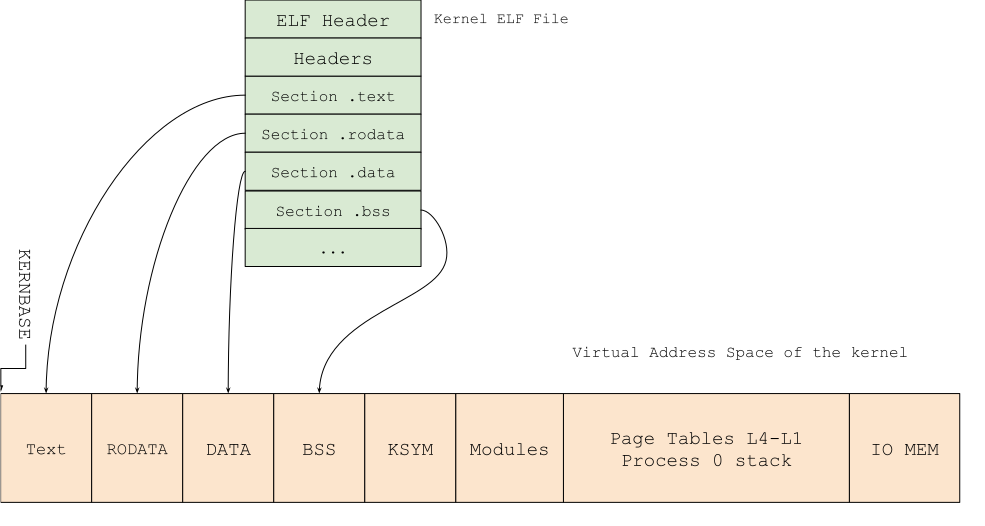
The kernel image is already in memory, loaded by the bootstrap code. Using the known start
and end of the image, we calculate offsets for the following sections: page tables, process
zero stack, and I/O memory for legacy devices. Below is a simplified map of kernel virtual
memory starting at KERNBASE:
#define KERNBASE 0xffffffff80000000 /* start of kernel virtual space */
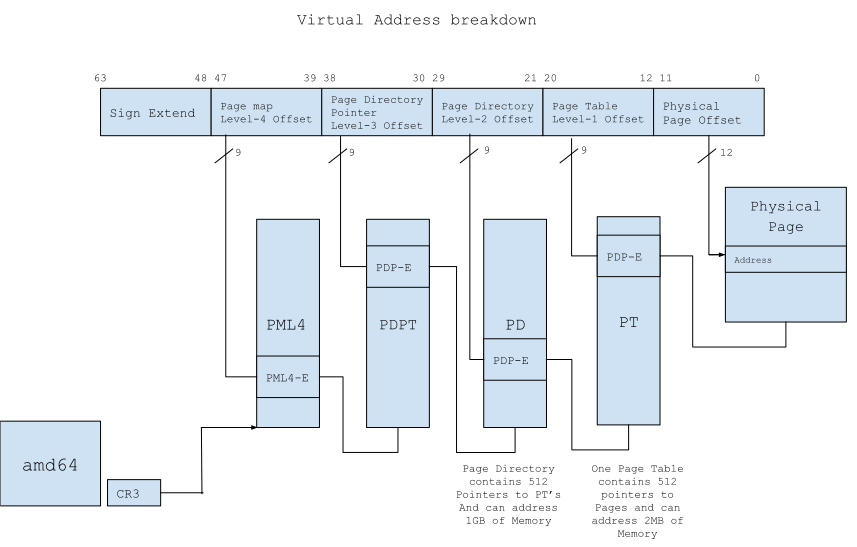
For AMD64, there are four levels of page tables: PML4 → PDPT → PD → PT. Before filling
them, they must be zeroed. Then we fill from PT (L1) up to PML4 (L4). The kernel stack,
kernel code, and other sections are mapped based on the known memory layout.
A breakdown of the 64-bit virtual address into page table indices:
After the page tables are mapped, PAE is enabled by setting flags in the control registers, and the LM-bit (bit 9) in the EFER register. This does not yet transfer the CPU to long mode — that requires a jump instruction. Before the jump, CR3 must point to the PML4 top entry.
Then paging is enabled by writing flags to CR0, followed immediately by a jump:
orl     $(CR0_PE|CR0_PG|CR0_NE|CR0_TS|CR0_MP|CR0_WP|CR0_AM), %eax
movl    %eax, %cr0
jmp     compat
compat:
After this, the CPU is in compatibility mode — a variant of long mode. One more step remains: load the Global Descriptor Table (GDT) and perform a far jump. Code segments and descriptors still exist in flat 64-bit mode because they establish processor privilege levels and operating mode (see AMD64 Architecture Programmer’s Manual Vol. 2, §4.8.1–4.8.2).
_C_LABEL(farjmp64):
.long   _RELOC(longmode)   /* RELOC: offset from kernel start to instruction */
movl    $RELOC(farjmp64), %eax
ljmp    *(%eax)

    .code64
longmode:
After the far jump — we are in long mode.
A few more steps remain before main can be called, but those will be covered in Part Two.
call    _C_LABEL(init_slotspace)
popq    %rdi
call    _C_LABEL(init_x86_64)
call    _C_LABEL(main)
Resources
- Minimal Boot Loader for Intel Architecture
- AMD64 Architecture Programmer’s Manual, Volume 2 — §4.8.1–4.8.2
- NetBSD source code
- Intel Software Developer’s Manual
- OSDev Wiki — most topics here can be explored in more depth